
Last updated on
Oct 31, 2026
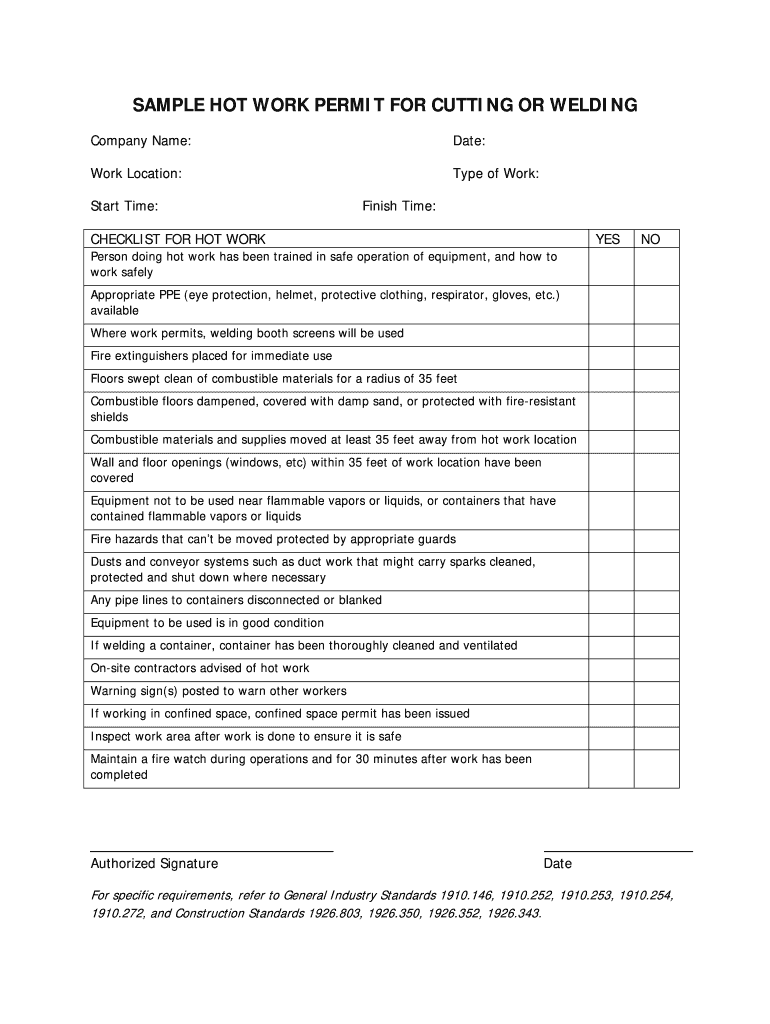
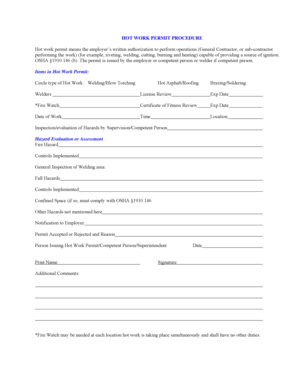
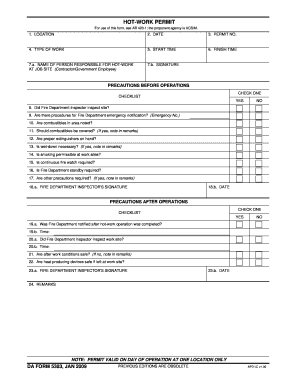
OSHCon Sample Hot Work Permit for Cutting free printable template
pdfFiller is not affiliated with any government organization

Fill out
Complete the form online in a simple drag-and-drop editor.

eSign
Add your legally binding signature or send the form for signing.

Share
Share the form via a link, letting anyone fill it out from any device.

Export
Download, print, email, or move the form to your cloud storage.
Why pdfFiller is the best tool for your documents and forms


End-to-end document management
From editing and signing to collaboration and tracking, pdfFiller has everything you need to get your documents done quickly and efficiently.
Accessible from anywhere
pdfFiller is fully cloud-based. This means you can edit, sign, and share documents from anywhere using your computer, smartphone, or tablet.
Secure and compliant
pdfFiller lets you securely manage documents following global laws like ESIGN, CCPA, and GDPR. It's also HIPAA and SOC 2 compliant.
What is OSHCon Sample Hot Work Permit for Cutting
The Hot Work Permit for Cutting or Welding is a safety document used by businesses to authorize and document hot work activities such as cutting and welding.
pdfFiller scores top ratings on review platforms




Fairly easy to use. Without this program, I'd have to handwrite or type info onto the form.
I love to be able to use the pdf filler app much easier and it has become very important for us in documents we need to fill out and sign and send. I would like to see some ease in the selecting the editing of a document, can the display of boxes for each section be less overlapping each other, this may be difficult to do. Sometimes when you have a saved pdf document you do updates rather than create a whole new document, we use them as templates. Right now the easiest way is to create a document in Word, save it as a Word doc and as a PDF doc. Which is okay, often, time is a factor and to quickly update a pdf file would be faster. Thanks for listening.
Who needs OSHCon Sample Hot Work Permit for Cutting?
Explore how professionals across industries use pdfFiller.

OSHCon Sample Hot Work Permit for Cutting is needed by:
-
Construction managers overseeing hot work operations
-
Safety officers responsible for workplace safety compliance
-
Welders and technicians conducting cutting or welding tasks
-
Business owners in industries performing hot work
-
Regulatory personnel reviewing safety permits
Comprehensive Guide to OSHCon Sample Hot Work Permit for Cutting
What is the Hot Work Permit for Cutting or Welding?
The hot work permit is a crucial safety document that ensures compliance during cutting and welding operations. It serves as a formal authorization for such activities, mitigating risks associated with fire and safety hazards. Signing the hot work authorization form not only records the necessary approvals but also acts as a vital document for accountability. Utilizing a hot work permit template streamlines this process, making it easier for teams to adhere to safety protocols.
Purpose and Benefits of the Hot Work Permit for Cutting or Welding
The primary purpose of the hot work permit is to enhance workplace safety by formally acknowledging the risks involved in cutting and welding. This permit safeguards environments by establishing specific protocols to minimize fire hazards. Key benefits include:
-
Ensuring compliance with safety regulations.
-
Documenting work activities for accountability.
-
Reducing the likelihood of accidents and costly damages.
Key Features of the Hot Work Permit for Cutting or Welding
A well-structured hot work permit includes essential fields that ensure thorough documentation. These features contribute to its effectiveness in promoting safety:
-
Work location details.
-
Type of work being conducted.
-
Safety checklist to ensure all precautions are in place.
Each feature plays a vital role in the effectiveness of the hot work authorization form, facilitating structured communication and accountability.
Who Needs the Hot Work Permit for Cutting or Welding?
Personnel involving in cutting and welding operations must obtain a hot work permit before commencing work. This includes a range of roles across various industries, such as:
-
Construction workers responsible for site safety.
-
Manufacturing staff engaged in production tasks.
In certain situations, particularly in high-risk environments, the permit becomes a mandatory requirement, underscoring its importance in maintaining safety standards.
How to Fill Out the Hot Work Permit for Cutting or Welding Online (Step-by-Step)
Completing the hot work permit online using pdfFiller is an efficient process. Follow these steps to ensure accurate submission:
-
Access the hot work authorization form on pdfFiller.
-
Fill in the required fields, such as work location and type of work.
-
Complete the safety checklist to confirm safety measures are in place.
-
Review for accuracy and completeness before submission.
These steps help avoid errors and ensure that your cutting and welding permit pdf is properly completed.
Common Errors and How to Avoid Them
When filling out the hot work permit, users often encounter common errors that can lead to processing delays. To ensure a smooth submission, consider these practical tips:
-
Double-check all filled fields for accuracy.
-
Ensure all required signatures are included.
By being vigilant during completion, users can effectively avoid typical mistakes associated with the safety permit for welding.
How to Sign or Notarize the Hot Work Permit for Cutting or Welding
Validating the hot work permit requires appropriate signatures, which can be achieved through digital means or traditional wet signatures. pdfFiller simplifies the eSigning process, making it convenient for authorized personnel to finalize the hot work authorization form securely.
Security and Compliance for the Hot Work Permit for Cutting or Welding
Handling sensitive documents like the hot work permit comes with inherent security responsibilities. pdfFiller implements robust security measures, including:
-
256-bit encryption for document protection.
-
Compliance with HIPAA and GDPR regulations.
These features ensure that all user data remains private and secure, fostering trust during the permit handling process.
What Happens After You Submit the Hot Work Permit?
Upon submission of the hot work permit, expect a structured processing timeline. Confirmation of receipt will typically be communicated, and should amendments be necessary:
-
Follow established procedures for corrections.
-
Maintain clear communication with relevant personnel for updates.
Addressing any issues promptly ensures the process remains efficient.
Utilize pdfFiller for Efficient Completion of Your Hot Work Permit
Utilizing pdfFiller for your hot work permit needs enhances efficiency through its cloud-based editing and eSigning capabilities. Security features, along with user-friendly functionality, empower users to complete their hot work authorization form with confidence and ease.
How to fill out the OSHCon Sample Hot Work Permit for Cutting
-
1.Access pdfFiller and search for 'Hot Work Permit for Cutting or Welding' to find the form.
-
2.Open the form in the pdfFiller interface, and review the blank fields available.
-
3.Gather essential information such as the work location, type of work, and start and finish times before you begin filling out the form.
-
4.Carefully navigate through each field in the pdfFiller interface, using available tools to add text or checkboxes where necessary.
-
5.Fill out details methodically, ensuring all specified fields are completed, including the safety measures checklist.
-
6.Once you have entered all required information, review the form for accuracy and ensure all sections are correctly filled.
-
7.Finalize your entries, making any edits as needed, and ensure correctness of signatures from authorized personnel.
-
8.When satisfied with the completed form, save your work on pdfFiller.
-
9.Choose to download the completed form or submit it electronically through the provided options in pdfFiller.

Who is eligible to use the Hot Work Permit?
Any business or contractor engaged in cutting or welding operations is eligible to use the Hot Work Permit. It is essential that the form is completed and signed by an authorized person to validate the permit.
What details are necessary when filling out the permit?
You'll need to provide information on the work location, type of work to be performed, the exact start and finish times, and ensure you check the safety measures required. Keep this information ready before filling out the form.
What should I do if I make an error on the form?
If you notice an error after filling out the form, you can use pdfFiller's editing tools to correct any mistakes before finalizing it. Double-check all information before signing.
How do I submit the Hot Work Permit once completed?
You can either download the completed Hot Work Permit from pdfFiller for physical submission or use the electronic submission option provided within pdfFiller, ensuring that all required signatures are included.
Are there any supporting documents required with the permit?
Typically, the Hot Work Permit does not require additional supporting documents unless specified by local regulations. Ensure to check with your safety officer or regulatory body if in doubt.
How long is the Hot Work Permit valid?
The permit's validity is generally tied to the duration of the hot work being performed. Ensure to clearly document start and finish times to maintain compliance with safety protocols.
What are common mistakes to avoid when completing the permit?
Common mistakes include leaving required fields blank, failing to obtain the necessary signatures, and not completing the safety checklist. Double-check all sections before submission to avoid these errors.



Related Catalogs
Get the latest insights from our blog


If you believe that this page should be taken down, please follow our DMCA take down process
here
.
This form may include fields for payment information. Data entered in these fields is not covered by PCI DSS compliance.